




 Indietro














Netskope Threat Research Labs has observed phishing attacks using decoy PDF files, URL redirection, and Cloud Storage services to infect users and propagate malware. Because many organizations have default “allow” security policies for popular Cloud Storage services and PDF readers to let users take advantage of these useful services, these attacks pass through the corporate network to end users’ machines undetected. Moreover, as users collaborate and share through cloud services, these malicious files posing as PDFs “fan out” to shared users, creating a secondary propagation vector. We are calling this the “CloudPhishing Fan-out Effect.”
In this blog, we will detail the insidious nature of CloudPhishing and the secondary fan-out using two recently detected cases. We will also illustrate how an attack – even if unsuccessful – may leave the target vulnerable to future attacks. Additionally, we will outline the Netskope protection stance, and general best practices to handle this attack.
CloudPhishing Fan-out
The CloudPhishing fan-out effect occurs when a victim inadvertently shares the phishing document with colleagues, whether internal or external, via a cloud service. This is particularly insidious in the cloud, as shared users lose the context of the document’s external origin and may trust the internally shared document as if it were created internally. The visual depiction of the attack chain showing the CloudPhishing fan-out is shown in Figure 1.
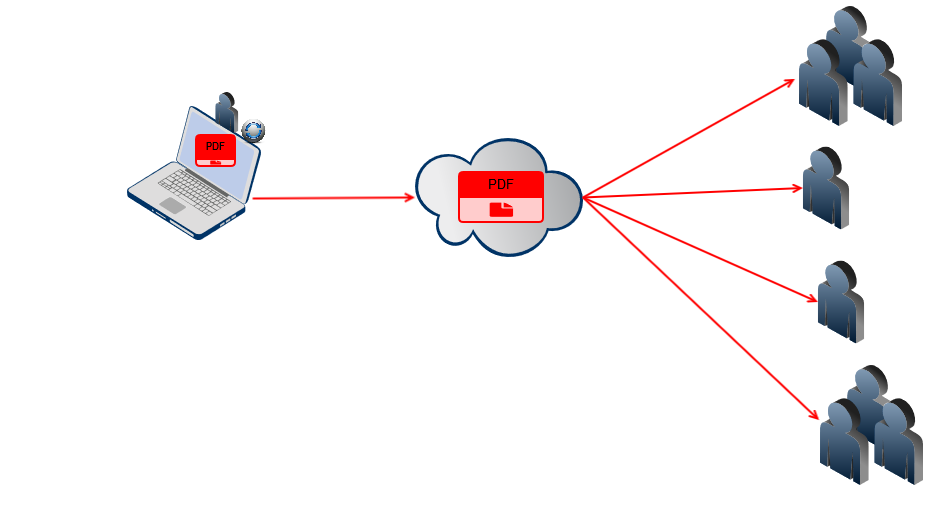 Figure 1: CloudPhishing fanout effect within shared users in the cloud
One example of this threat is an invoice decoy document named “Invoice_2884.pdf” (MD5 – 987a95d47ea99fe32e4ce095c591383f), which has been shared in Microsoft OneDrive for Business. Other than having the file shared in OneDrive, the SaaS application is unrelated to the attack. This threat, seen in one of our customer environments, is detected by Netskope Active Threat Protection as Backdoor.Phishing.FW.
The decoy PDF is usually delivered as an email attachment named,“invoice” in an attempt to lure the victim into executing the file. When the user opens the PDFdocument and inadvertently clicks the hyperlink in the PDF, the decoy PDF retrieves a phished page referenced by the TinyURL service, as shown in Figure 2.
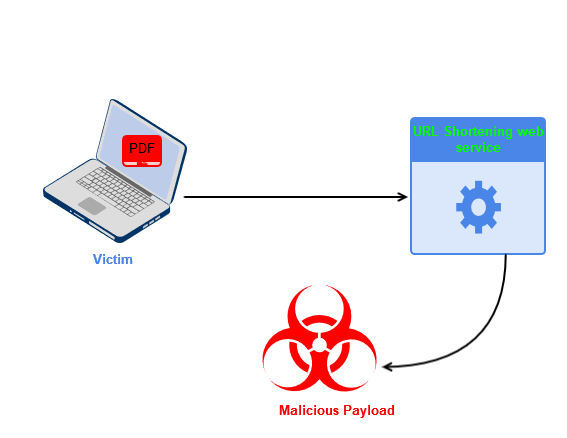
Figure 2: Visual depiction of the working of the PDF decoy, Invoice_2884.pdf
Analysis of the PDF decoy, Invoice_2884.pdf
On execution of the PDF decoy, “Invoice_2884.pdf,” the victim is presented with a secured PDF online document message, luring him or her to click on the “View On Adobe” hyperlink to view the document, as shown in Figure 3.
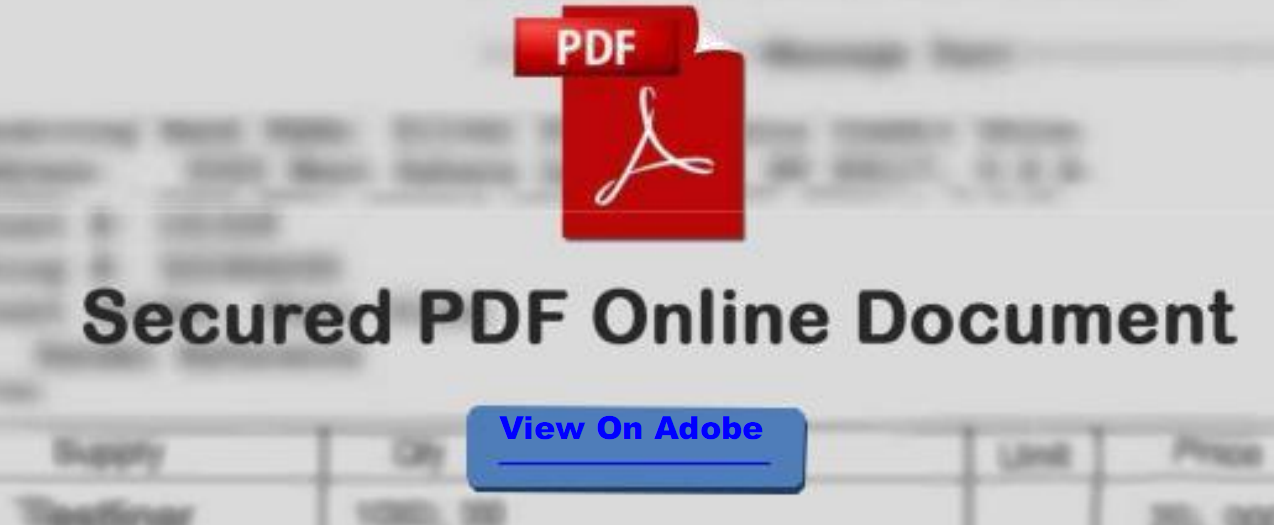
Figure 3: Message displayed on opening Invoice_2884.pdf
Upon clicking the “View on Adobe” hyperlink, the victim is displayed with a security warning message from Adobe that the document is trying to connect to the TinyURL redirection service link, as shown in Figure 4.
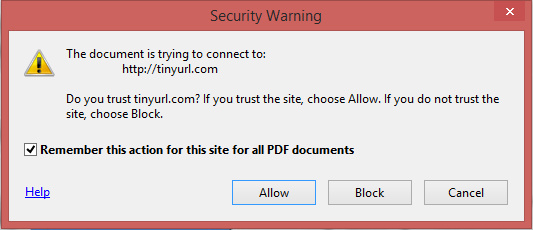
Figure 4: Invoice_2884.pdf connecting to TinyURL redirection service link
If this action is allowed without un-checking the “Remember this action…,” all future connections to TinyURL.com will be allowed without any security warning prompts from the victim’s machine, as shown in Figure 5. This, in effect, weakens the security posture of the endpoint against future attacks.
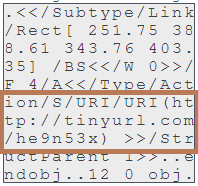
Figure 5: Connection to TinyURL.com set to “Always Allow”
Allowing this action paves a pathway for the attacker to carry out future actions by launching decoys from the allowed domains list.
The decoy PDF connects to the TinyURL link, https://TinyURL[.]com/he9n53x, as shown in Figure 6.
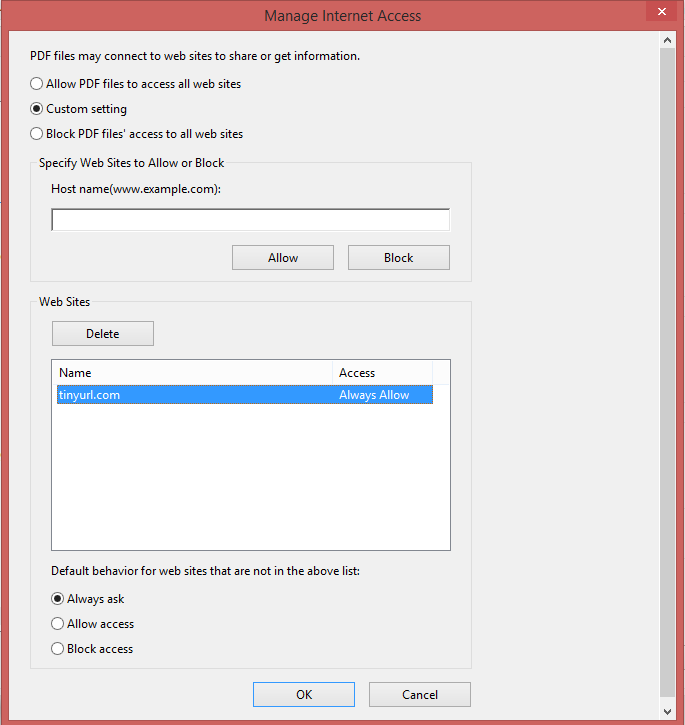
Figure 6: Hyperlink in the PDF decoy, Invoice_2884.pdf
The TinyURL link redirects to the link, https://www.pdf.anothersideofpeace[.]org/PO.htm. The attacker used the TinyURL link as an evasive tactic to hide the original link. At the time of analysis, the web page was down and not serving any content. This might be because the web page was removed or renamed. The web page was also blocked by the Chrome browser, as shown in Figure 7.
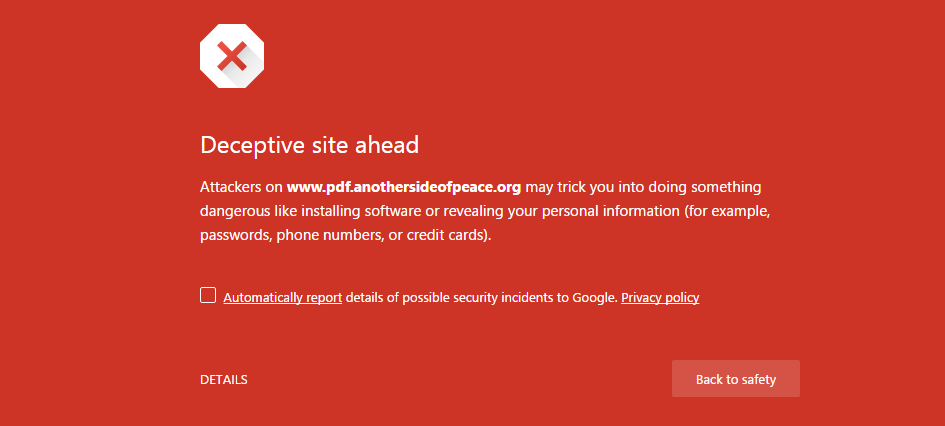
Figure 7: Blocked web page by Chrome browser
Similarly-themed PDF decoy strains
We identified similar strains of decoy PDF documents that retrieve phished pages hosted in several URL redirection services and Cloud Storage services. The visual depiction of protection via Netskope Active Threat Protection for the PDF decoy using Cloud Storage services for retrieving the phished pages and the CloudPhishing fan-out effect is shown in Figure 8.
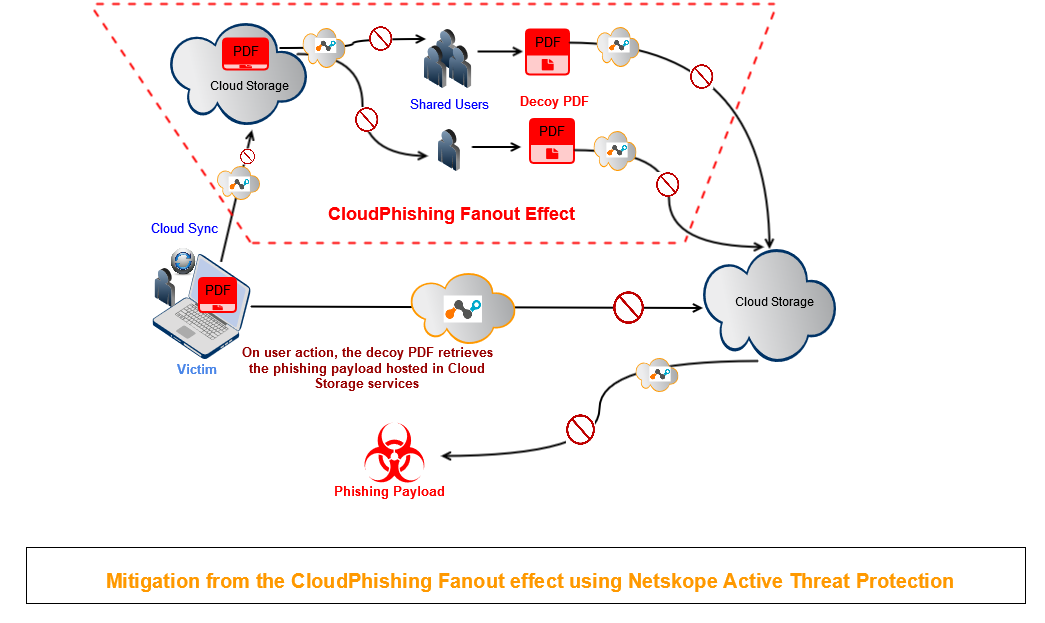
Figure 8: Protection from the CloudPhishing Fan-out effect
Analysis of a Second CloudPhishing PDF decoy using Cloud Storage services
One case of the PDF decoy we observed using Cloud Storage services to deliver a phished page, was compressed in a ZIP archive named “Kindly confirm our inquiry.zip.” The ZIP file contained a PDF document named “Inquirys.PDF,” as shown in Figure 9.
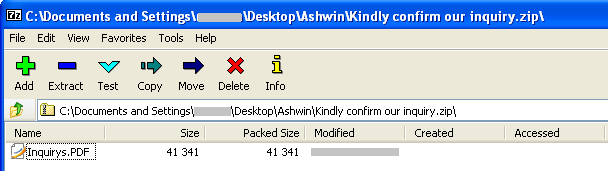
Figure 9: CloudPhising PDF decoy present in the file, “Kindly confirm our inquiry.zip”
The PDF decoy, “Inquirys.PDF,” is detected by Netskope Active Threat Protection as Backdoor.Scm.EX.
Upon execution of the PDF decoy, the victim is presented with a message that the document is highly secured by Adobe and prompted to click on the “DOWNLOAD NOW” hyperlink to view the document, as shown in Figure 10.
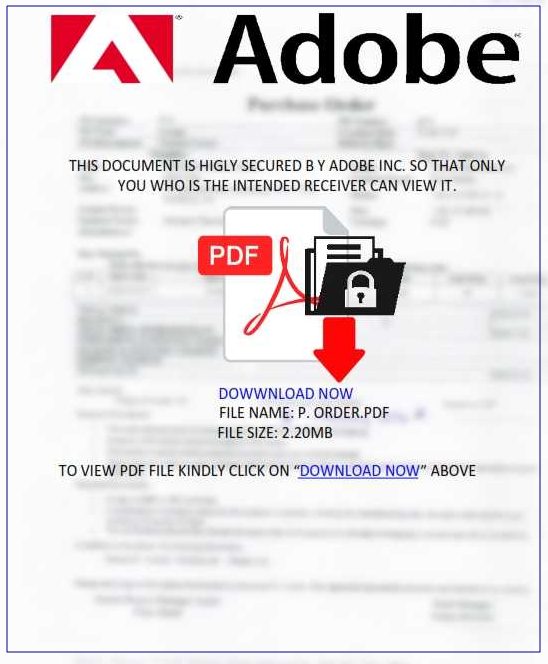
Figure 10: Message displayed on execution of PDF decoy, “Inquirys.PDF”
Upon clicking the “DOWNLOAD NOW” hyperlink, the victim is presented with a message that the document is trying to connect to Dropbox, as shown in Figure 11.
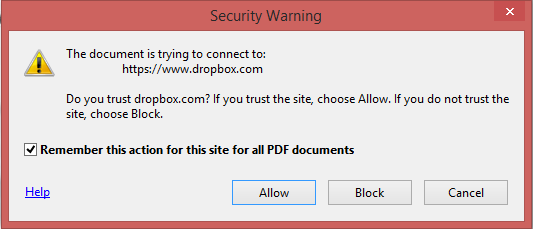
Figure 11: “Inquirys.PDF” connecting to Dropbox
As mentioned earlier with the TinyURL redirection service, if this action is allowed without un-checking the “Remember this action…,” all future connections to dropbox.com will be allowed without any security warning prompt from the victim’s machine, as shown in Figure 12.
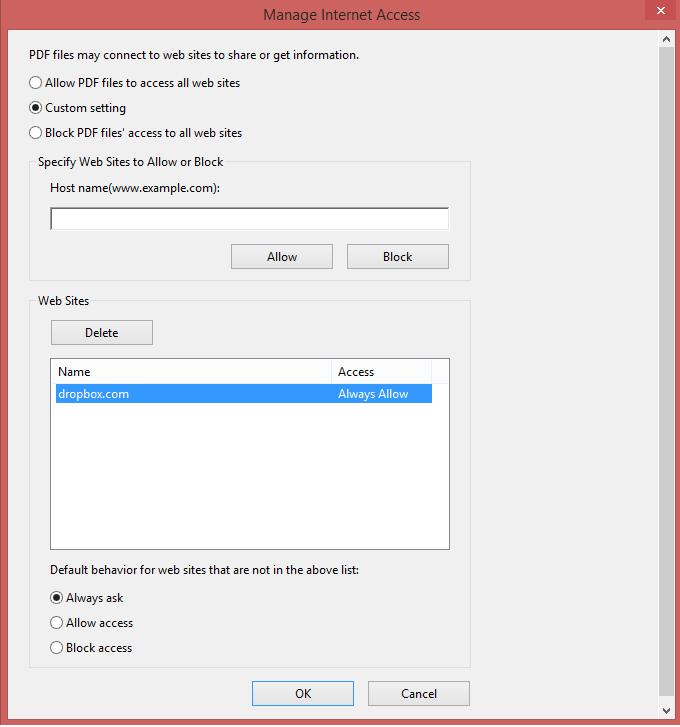
Figure 12: Connection to dropbox.com set to “Always Allow”
The decoy PDF connects to the Dropbox link, https://www.dropbox[.]com/s/bm0lqz2jf0ya4el/52439765REQ.html?dl=1, as shown in Figure 13.
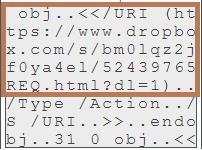
Figure 13: Hyperlink in the PDF decoy, “Inquirys.PDF”
The download link retrieves a phished login page named “Inquire,h (1).html” to the user’s machine, as shown in Figure 14.
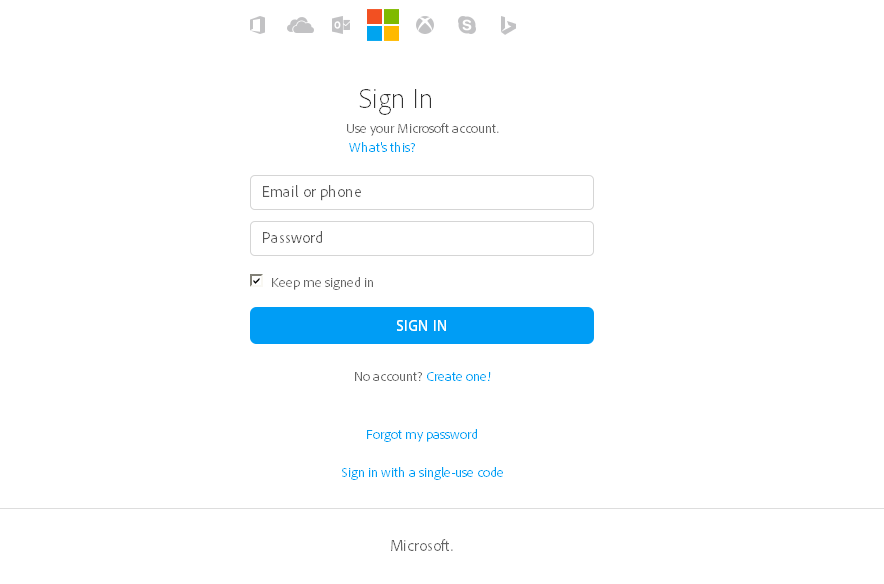
Figure 14: “Inquire,h (1).html” phished login page
The source of the phished page contains a POST action to the website, https://wisdomschool[.]cf/include/encrypted/davidmckiernan7.php, as shown in Figure 15.

Figure 15: Victim’s credentials uploaded to a website
Upon entering the login details in the phished page, the victim’s credentials are uploaded to the attacker’s address, as shown in Figure 16.
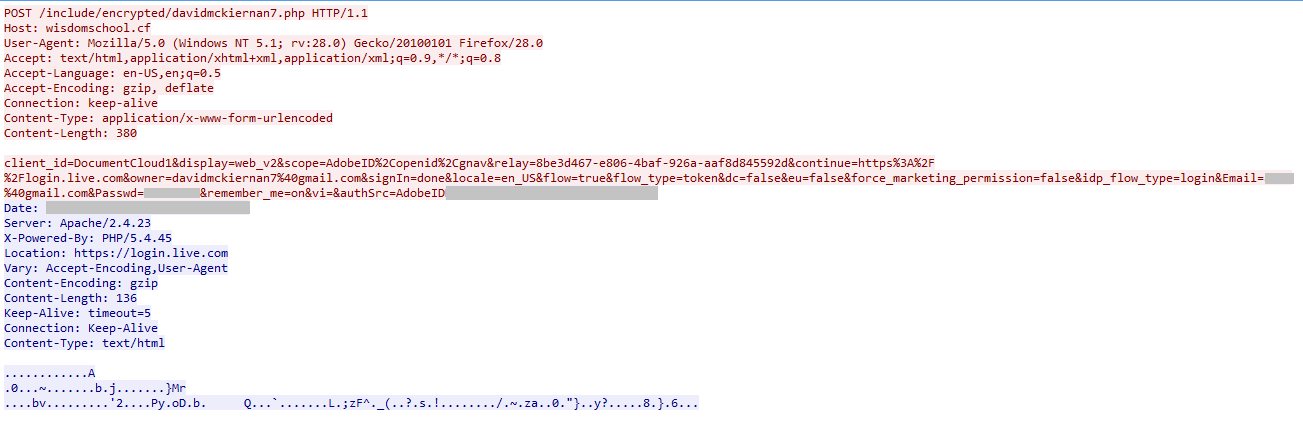
Figure 16: Packet capture showing the victim’s credentials being uploaded to a website
Once the credentials are uploaded to the website, the victim is redirected to the original login page, https://login.live.com, and is again asked to enter his or her credentials.
Default Allow Policy in Adobe Acrobat Reader Software
Our analysis showed that the Adobe Acrobat Reader prompts a security warning to the user when the document connects to a link. This feature allows any URL related to the domain that is on the allowed list. Based on the behavior seen in the latest version of the Adobe Acrobat Reader, we recommend users un-check the “Remember this action…” option while allowing the PDF to connect to an external link. We also advise users to hover their mouse over the hyperlink to confirm the link and also regularly monitor managed Internet access settings in the PDF reader’s Trust Manager.
The phishing PDF decoys showcase the use of URL redirectors and cloud services, and also a secondary propagation vector within the shared users leading to the CloudPhishing fan-out. By taking advantage of the “default allow” action in popular PDF readers, the attacker can easily deploy multiple attacks without getting the security warning after the first alert. This makes the attacker effectively a host for phishing pages or malicious payloads using URL redirection services and Cloud Storage services. Netskope has contacted Dropbox to take down the URL hosting the phished page. We will continue to monitor the decoy documents using Cloud Storage services and update our findings on the developments.
General Recommendations
Netskope recommends the following to combat CloudPhishing and malware threats:
- Detect and remediate all threats at rest in sanctioned cloud services using a threat-aware Cloud Access Security Broker like Netskope
- Detect and remediate all threats being downloaded from unsanctioned cloud services using a threat-aware solution like Netskope
- Actively track usage of unsanctioned cloud services and enforce DLP policies to control files and data en route to or from your corporate environment
- Regularly back up and turn on versioning for critical content in cloud services
- Enable the “View known file extensions” option on Windows machines
- Un-check the option “Remember this action for this site for all PDF documents” in the PDF reader software
- Hover your mouse over all hyperlinks to confirm them before clicking on the link
- Actively track URL links added to the “Always Allow” list in PDF reader software
- Avoid executing any file unless you are very sure that they are benign
- Warn users to avoid opening untrusted attachments regardless of their extensions or file names
- Keep systems and antivirus updated with the latest releases and patches


 Leggi il blog